A program that outputs the configuration file for the DIO(GPIO) for a 32 pins μC.
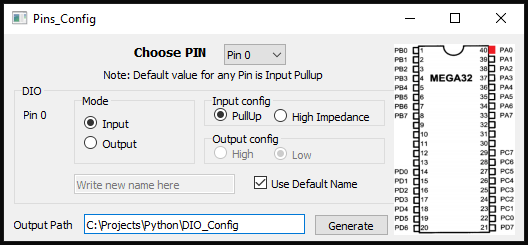
Here is the link to the source code on github.
Short Description
This python script consists of four main functions.
Save:
This function saves the current progress and it is called upon after changing anything using the GUI in two main arrays “Mode array, Direction array”.
Menu:
This function is called when a new pin is selected through the drop down menu and it changes the values of anything on the GUI according to the last value of that pin.
Generate:
This function is called when the generate button is pressed, it loops on the mode and direction arrays and starts adding the output to DIO_Config.h file.
The other parts of the code are related to creating the GUI itself which was done using QT designer.
As for the GUI options, the drop down menu allows choosing a pin(0-31), radio buttons to choose input or output, radio buttons to choose input-pulledup or input-highimpedence or output-high or output-low, an image to see the location of that pin on ATmega32, a check box to toggle between using the standard name for the pins or a custom name, a text box to enter the location of the output file (by default it is the scripts path) and a generate button to generate the output file.
Note: In the repo you will find three different scripts, the simple doesn’t contain the image part, the advanced contains the image part and more reliable (recommended) and the extra contains a menu where you could save your current progress or load the previous save without actually generating the configuration file.
 thechosenstranger.movie.blog